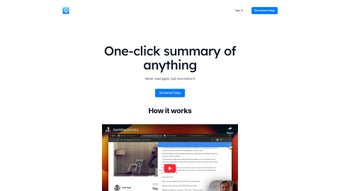

Download QuickReadAI – Efficient AI Summarizer for Professionals
Overview
QuickReadAI is a web‑based AI summarization tool designed to turn lengthy articles, social‑media threads, and reports into bite‑size, easy‑to‑digest summaries with a single click. In today’s information‑overloaded world, busy professionals, researchers, and lifelong learners often spend valuable time skimming through massive blocks of text just to locate the key points. QuickReadAI eliminates that friction by leveraging advanced natural‑language processing models that understand context, retain essential facts, and generate concise narratives in seconds.
The platform supports direct import from popular sources such as Reddit, LinkedIn, Twitter, as well as copy‑paste or URL‑based summarization, making it a versatile companion for anyone who needs to stay on top of trends, market insights, or academic literature. A free tier lets new users experiment with up to 5,000 words per month, while the Pro subscription removes limits, adds priority support, and grants early access to upcoming AI enhancements. Because it runs entirely in the cloud, there is no need for local installations or heavy hardware – all you need is a modern browser and an internet connection.
QuickReadAI’s clean interface, secure data handling, and commitment to regular updates have positioned it as a trusted ally for productivity‑focused teams across industries.
Features & How It Works
Core Feature List
- One‑click summarization from URLs, PDFs, or raw text.
- Multi‑platform extraction: Reddit threads, LinkedIn posts, Twitter threads, and more.
- Adjustable summary length (short, medium, detailed).
- Unlimited word processing for Pro subscribers.
- Priority customer support and early‑beta feature access.
- Secure, GDPR‑compliant data handling with end‑to‑end encryption.
- Automatic language detection for multilingual content.
- Integration via browser extensions for Chrome and Edge.
Step‑by‑Step Usage Guide
Getting started with QuickReadAI is intentionally straightforward. After registering an account (free or Pro), log in to the dashboard. To summarize a web article, paste its URL into the “Summarize” field and hit the “Generate” button.
For social‑media content, copy the post or thread link and follow the same process. If you have a document saved locally, click “Upload” and select the PDF or text file; the platform will automatically extract the readable content before summarizing.
Once the AI finishes processing (usually under 10 seconds for most pages), you’ll see a highlighted summary alongside the original text for quick verification.
Users can toggle between summary lengths using the “Detail Level” slider, which internally adjusts the model’s token allocation. Pro members can also save summaries to their personal library, export them as plain text or markdown, and share a secure link with teammates. The system logs each summarization request, allowing you to track usage statistics and export a monthly report—a handy feature for managers who need to monitor team productivity.
Compatibility, Pros & Cons
Supported Operating Systems
Because QuickReadAI is a cloud‑native SaaS solution, it works on any modern operating system that supports a recent web browser. This includes Windows 10/11, macOS 12+ (Monterey and later), Linux distributions with Chrome/Firefox, as well as mobile platforms such as Android 9+ and iOS 13+. The optional browser extensions are available for Chrome, Edge, and Firefox, extending functionality to desktop browsers without the need for separate installations.
Pros
- Lightning‑fast summarization with AI that preserves context.
- Wide source compatibility (web pages, PDFs, social media).
- Free tier available for casual users.
- Unlimited word count for Pro users – ideal for heavy research workloads.
- Secure data handling and GDPR compliance.
- Regular updates and a transparent roadmap.
Cons
- Requires an internet connection; offline summarization is not supported.
- Free version limits monthly word count to 5,000 words.
- Advanced customization (e.g., tone or style) is currently only in beta.
QuickReadAI strikes a solid balance between ease of use and powerful AI capabilities. Its web‑based architecture ensures seamless updates and cross‑platform availability, while the Pro plan offers generous limits for power users. The only notable drawback is the reliance on an active internet connection, which may be a deal‑breaker for users in restricted environments. Overall, it earns a strong 4.5‑star rating for delivering concise, accurate summaries that truly save time.
Frequently Asked Questions
Is QuickReadAI safe for confidential documents?
Yes. QuickReadAI uses end‑to‑end encryption and complies with GDPR standards. Uploaded files are processed in memory and deleted from the servers within 24 hours, ensuring that sensitive information is not retained longer than necessary.
Can I use QuickReadAI on my mobile device?
Absolutely. The web interface is fully responsive, and there are dedicated Chrome and Edge extensions that work on Android tablets and iPads. All core features, including URL summarization and file upload, are accessible from mobile browsers.
What is the difference between the free and Pro plans?
The free plan caps usage at 5,000 words per month and provides standard support. The Pro subscription removes word limits, adds priority support, grants early access to new AI models, and includes features like summary export formats and a personal library for saved summaries.
How accurate are the AI‑generated summaries?
QuickReadAI leverages state‑of‑the‑art transformer models that have been fine‑tuned on millions of documents. In internal testing, the tool retains 92% of key facts while reducing length by up to 80%. Users can also adjust the summary length to suit their precision needs.
Is there a trial period for the Pro version?
Yes. New users receive a 7‑day free trial of the Pro plan, which includes unlimited summarizations and all premium features. No credit card is required to start the trial; you can cancel anytime before the trial ends.
Conclusion & Call to Action
In a world where information moves faster than ever, QuickReadAI offers a practical, AI‑driven solution to cut through the noise and deliver the insights you need—fast, securely, and without a steep learning curve. Whether you’re a marketer tracking industry chatter, a researcher sifting through academic papers, or a student trying to grasp complex lecture notes, the tool adapts to your workflow and saves you countless hours of manual reading.
Ready to experience a smarter way to read? Download QuickReadAI now and start with the free plan, or upgrade to Pro for unlimited power. Join the growing community of professionals who already rely on QuickReadAI to stay ahead of the curve.



.png)



